

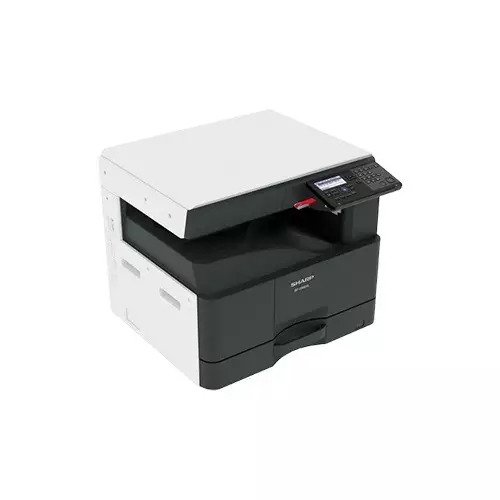
A photocopy machine, or just a photocopier for short, is that handy office gadget that helps you whip up paper copies of documents or pictures in no time. It uses a mix of light, heat, toner, and electricity to capture text and images from one page and transfer them to another. You’ll find these machines being used everywhere—offices, schools, libraries, government buildings, print shops, and even home offices. They’re pretty much a must-have for anyone who needs to make copies quickly!
Short History of the Photocopy Machine
The idea of photocopying originated in the early 20th century as a way to quickly duplicate documents without carbon paper. In 1938, Chester Carlson, an American physicist, invented xerography, producing the first dry copy in his New York lab. His first phrase copied was “10-22-38 Astoria.” Carlson teamed up with the Haloid Company, which later became Xerox, to develop xerography into a commercial technology. In 1959, the Xerox 914 was launched as the first automatic plain-paper photocopier, greatly transforming office work by making copying fast and easy. During the 1970s to 1990s, photocopiers became smaller and faster. Color copying was introduced, and features like automatic feeders and duplex copying became common. In the 2000s and beyond, modern photocopiers evolved into multifunction machines that can print, scan, copy, and fax, utilizing advanced laser technology and digital imaging.
Working Process of a Photocopier
Most modern photocopiers utilize laser and toner technology. To make a copy, you place a document on the glass surface or in the automatic feeder. A bright light scans the document, and the machine uses electrostatic charges to attract toner powder, which shapes itself to match the scanned image. The toner is then fused to a blank sheet of paper using heat and pressure, producing a copy of the original document. Modern copy machines commonly offer several functions, including copying, printing, scanning, faxing, duplex (double-sided) copying, and resizing documents. These multifunction devices are often referred to as MFPs (Multifunction Printers).
Importance of a Photocopier
Photocopiers are indispensable tools in any office or business environment due to their ability to produce copies rapidly and efficiently. They significantly reduce the need for manual copying, saving valuable time and effort for employees. Additionally, these machines excel in high-volume document processing, making it easy to handle large print jobs without compromising quality. Furthermore, they consistently deliver sharp and clear print quality, ensuring that every copy meets professional standards.
The steps to follow before purchasing
A photocopy machine is an essential tool for businesses, schools, print shops, and even home offices. With so many models and features in today’s market, choosing the right copier can feel overwhelming. This guide breaks down everything you need to know before purchasing so you can invest with confidence.
1. Determine Your Copying Volume
The first step in selecting a photocopier is understanding how much work it will handle.
Copy Volume Categories
Low Volume (≤ 3,000 pages/month)Ideal for home offices or small businesses that only need occasional copying.
Medium Volume (3,000–10,000 pages/month) Suitable for most small to medium-sized offices.
High Volume (10,000–50,000 pages/month).Best for busy offices, schools, and administrative departments.
Production Volume (50,000+ pages/month), Designed for print shops, service bureaus, and large enterprises.
Choose a machine whose recommended duty cycle aligns with your expected monthly output to prevent premature wear and breakdowns.
2. Choose Between Inkjet and Laser Technology
Your budget and workload will determine which printing technology is best.
Laser Copiers-Faster printing and copying, Lower cost per page, Ideal for high-volume environments, Sharper text, good for office documents
Inkjet Copiers-Lower initial purchase price, Better color accuracy for graphics and photos, Slower and more expensive per page, Best for small offices or creative needs
3. Consider Functionality: Do You Need an MFP?
Modern photocopiers often come as Multifunction Printers (MFPs), combining several machines into one.
Common MFP features: Printing, Scanning, Faxing, Automatic Document Feeder (ADF), Double-sided (duplex) printing/copying
Choosing an MFP eliminates the need to buy separate equipment, saving space and money.
4. Assess Print and Copy Speed (PPM)
Speed matters in busy environments. Photocopiers are rated in pages per minute (PPM).
Recommended speeds:
Small office: 20–30 ppm, Medium office: 30–50 ppm, Large office: 50+ ppm
If your team often shares a copier, a faster model reduces bottlenecks and improves workflow efficiency.
5. Evaluate Paper Handling and Size Compatibility
Ensure the machine supports the types and sizes of paper you use.
Check for: Paper tray capacity (250–3000+ sheets)
Multiple trays for different paper types
Support for A4, Letter, Legal, or A3 (A3 machines are larger and more expensive)
Heavy media support for cardstock or labels
6. Print Resolution and Quality
Resolution is measured in DPI (dots per inch), which determines sharpness.
600 × 600 dpi: Sufficient for text and simple graphics
1200 × 1200 dpi: Needed for high-quality images, brochures, and professional materials
Choose a higher resolution if color accuracy and clarity matter in your work.
7. Connectivity and Network Features
A modern photocopier should integrate smoothly with your workflow.
Essential connectivity options: USB, Ethernet (wired network), Wi-Fi
Mobile printing (AirPrint, Google Cloud Print, Mopria)
Cloud integration (Dropbox, OneDrive, Google Drive)
Remote printing and scanning improve convenience in hybrid or distributed office setups.
8. Operating Costs: Toner, Ink & Maintenance
The purchase price is only part of the cost—long-term expenses matter more.
Consider:
Cost per page (CPP)
Toner/ink yield
Drum and maintenance kit lifespan
Availability of spare parts
Laser models often cost more upfront but save money in the long run.
9. Security Features
In offices handling sensitive data, copier security is critical.
Look for: User authentication, Encrypted storage, Secure print release, Automatic memory wipe, Access control. These features protect confidential documents and comply with privacy regulations.
10. Brand Reputation and Service Support
Reliable after-sales support is essential, especially for business machines.
Well-known brands include:
Canon, Ricoh, Konica Minolta, Xerox, HP, Sharp, and Kyocera.
Check:
Warranty terms, Availability of local technicians, Service contracts, Customer reviews, A copier with poor support can cost more in downtime and repairs.
11. Budget and Pricing
Photocopier prices vary widely.
Typical price ranges:
Home/Small office: 25000 – 73000 Taka
Mid-range office copiers: 121000 – 488000 Taka
A3 multifunction copiers: 488000 – 1465637 Taka
High-volume production machines: 1832046 – 12213642 + Taka
Consider leasing if you want predictable monthly payments and regular upgrades.
Recommended and Popular Models in 2025
High-Performance & Enterprise Copiers
These are suited for large offices, high volume, and advanced workflows:
Canon imageRUNNER ADVANCE DX C5870i – Very fast, powerful machine for large offices with strong workflow automation.
HP LaserJet Managed MFP E87660z – Excellent color output and professional-level features, with cloud integration.
Xerox AltaLink C8170 – Enterprise-grade multifunction system with advanced security and connectivity.
Mid-Range Office Copiers
Great for medium-sized offices and everyday use:
Canon imageRUNNER C3326i – A balanced A3 color photocopier suitable for general office use.
Canon imageRUNNER 2224 / 2224N – A3 monochrome copiers ideal for offices with basic needs.
Sharp MX-6070N – A multifunction copier with good speed and capacity for busy office environments.
Kyocera TASKalfa 4012i – Solid A3 MFP with LAN, RADF, and auto duplexing features.
Budget & Small Office Copiers
Affordable and reliable for smaller teams and shops:
Toshiba e-Studio 2528A / 2020AC / 2323AMS – Well-liked for balanced performance and price.
Sharp BP-20M24L – Compact and reliable multifunction model.
Star Tech
Ricoh M 2701 – A dependable monochrome multifunction copier for smaller offices.
onixbd.com
Conclusion
Choosing the right photocopy machine depends on your workload, performance expectations, and budget. Evaluate factors such as volume, print speed, functionality, connectivity, and long-term operating costs. By understanding your office needs and selecting a copier that fits them, you can significantly improve productivity and reduce expenses.
Professional maintenance service in Bangladesh
There are various online and offline stores in Bangladesh, including Techland BD. Techland BD is one of the most trusted electronics and IT companies in Bangladesh. From here, you can buy all your favourite electronic products and get installation and Professional Maintenance services. Installation services are provided by skilled engineers here. They offer a range of electronic products, skilled installation services, and original products at competitive prices in BD.Buy Original products at reasonable prices at Techland BD and visit the website or contact your nearest Techland BD branch.
